> ## Documentation Index
> Fetch the complete documentation index at: https://polar.sh/docs/llms.txt
> Use this file to discover all available pages before exploring further.
# Embedded Payment Method
> Embed our payment method flow on your site
Let your customers securely add a payment method without leaving your site.
## Getting a session token
Every embed is authenticated with a short-lived **customer session token**. Create it **on your server** to keep the Polar access token secret, then hand the token to the client.
```ts theme={null}
import { Polar } from "@polar-sh/sdk";
const polar = new Polar({ accessToken: process.env.POLAR_ACCESS_TOKEN });
const session = await polar.customerSessions.create({
customerId: "the-customer-id",
});
```
The token expires after one hour and is scoped to that single customer.
## Implementation
Start by installing the SDK.
```bash npm theme={null}
npm install @polar-sh/checkout
```
```bash pnpm theme={null}
pnpm add @polar-sh/checkout
```
```bash yarn theme={null}
yarn add @polar-sh/checkout
```
```bash bun theme={null}
bun add @polar-sh/checkout
```
### Modal
`PolarEmbedPaymentMethod.create()` opens the embed as a full-screen modal overlay.
```ts theme={null}
import { PolarEmbedPaymentMethod } from "@polar-sh/checkout/payment-method";
const embed = await PolarEmbedPaymentMethod.create({
sessionToken: session.token,
});
embed.addEventListener("success", (event) => {
console.log({event});
});
```
`create()` options:
| Option | Type | Default | Description |
| -------------- | ------------------------------ | ----------- | ---------------------------------------------------------------------------------------------------------------------------- |
| `sessionToken` | `string` | — | **Required.** Customer session token. |
| `theme` | `'light' \| 'dark'` | `light` | Colour scheme. |
| `setAsDefault` | `boolean` | `true` | Whether the new card should become the customer's default payment method. |
| `returnUrl` | `string` | current URL | Where to return the customer after a redirect-based payment method (Amazon Pay, Klarna). Defaults to `window.location.href`. |
| `locale` | `string` | `'en'` | BCP47 locale for the embed UI and Stripe Elements (e.g. `'en'`, `'fr-FR'`). Unsupported locales fall back to English. |
| `onLoaded` | `(event: CustomEvent) => void` | — | Convenience callback for the `loaded` event. Equivalent to `embed.addEventListener('loaded', …)`. |
### Modal in React
Open the modal from a Client Component event handler:
```tsx theme={null}
"use client";
import { PolarEmbedPaymentMethod } from "@polar-sh/checkout/payment-method";
interface Props {
sessionToken: string;
}
export function AddPaymentMethodButton({sessionToken}: Props) {
const onClick = async () => {
const embed = await PolarEmbedPaymentMethod.create({ sessionToken });
embed.addEventListener("success", (event) => {
console.log({event});
});
};
return ;
}
```
### Inline embed (vanilla JS)
Mount a chrome-less, auto-resizing iframe into an element you control:
```ts theme={null}
import { PolarEmbedPaymentMethod } from "@polar-sh/checkout/payment-method";
const embed = PolarEmbedPaymentMethod.createInline({
sessionToken: session.token,
element: document.getElementById("payment-method")!,
});
embed.addEventListener("success", (event) => {
console.log({event});
});
```
`createInline()` accepts the same options as `create()` (except `returnUrl`) plus a required `element` (the container to mount into).
### Inline embed (React)
Use the `` component:
```tsx theme={null}
import { PolarPaymentMethod } from "@polar-sh/checkout/react/payment-method";
return (
console.log({paymentMethodId})}
/>
);
```
### Code Snippet
The simplest integration: add the script and a trigger element with `data-polar-payment-method`. Clicking the element opens the modal.
```html theme={null}
```
The same script also powers embedded checkout triggers — one tag covers every Polar embed.
| Attribute | Value | Description |
| ------------------------------------------ | --------------- | ------------------------------------------------------------------------------------------------- |
| `data-polar-payment-method` | `string` | **Required.** The session token. Clicking the element opens the modal. |
| `data-polar-payment-method-theme` | `light \| dark` | Optional theme override. |
| `data-polar-payment-method-set-as-default` | `true \| false` | Optional. Default `true`. Pass `"false"` to add the card without overriding the existing default. |
| `data-polar-payment-method-return-url` | `string` | Optional. Return URL for redirect-based payment methods. Defaults to the current page. |
| `data-polar-payment-method-locale` | `string` | Optional. BCP47 locale (e.g. `'en'`, `'fr-FR'`). Unsupported locales fall back to English. |
## Localization
The embed is fully localized, pass a BCP47 code via the `locale` option (or `data-polar-payment-method-locale` attribute):
```ts theme={null}
const embed = await PolarEmbedPaymentMethod.create({
sessionToken: session.token,
locale: "fr-FR",
});
```
When omitted, the embed defaults to English. Unsupported locales also fall back to English. See [Localization](/features/checkout/localization) for the full list of supported languages.
## Events
All events are dispatched as cancelable `CustomEvent`s on the `embed` instance. Call `event.preventDefault()` to opt out of the SDK's default action.
| Event | Detail | Default action |
| ----------- | ----------------------------------------------------------------------------------- | ------------------------------------------------------------------- |
| `loaded` | — | Removes the loader spinner once the iframe is ready. |
| `close` | — | Tears down the iframe (unless locked by a pending `confirmed`). |
| `confirmed` | — | Marks the modal as non-closable while Stripe is processing. |
| `success` | `{ paymentMethodId: string }` | **Auto-closes the modal.** Call `preventDefault()` to keep it open. |
| `error` | `{ code: 'invalid_request' \| 'unauthorized' \| 'processing_failed' \| 'unknown' }` | Re-enables closing the modal after a failure. |
## Redirect-based payment methods
Some payment methods authorise on the provider's own site. The browser navigates the whole tab away and back to `returnUrl` (defaults to the page the SDK was opened from), so the modal can't survive the round-trip.
Read the outcome on the returned page with the static `getRedirectResult()`:
```ts theme={null}
import { PolarEmbedPaymentMethod } from "@polar-sh/checkout/payment-method";
const result = PolarEmbedPaymentMethod.getRedirectResult();
// result: { status: 'succeeded' | 'failed' } | null
if (result?.status === "succeeded") {
// refresh the customer's payment methods
}
```
In React, use the `usePaymentMethodRedirectResult` hook to avoid writing your own effect:
```tsx theme={null}
import { usePaymentMethodRedirectResult } from "@polar-sh/checkout/react/payment-method";
usePaymentMethodRedirectResult({
onSuccess: () => console.log("Payment method added"),
onError: () => console.error("Could not add payment method"),
});
```
Either way, the status query param is stripped from the URL so a refresh won't surface a stale result. Card payments (3DS) complete inside the modal and never trigger this path.
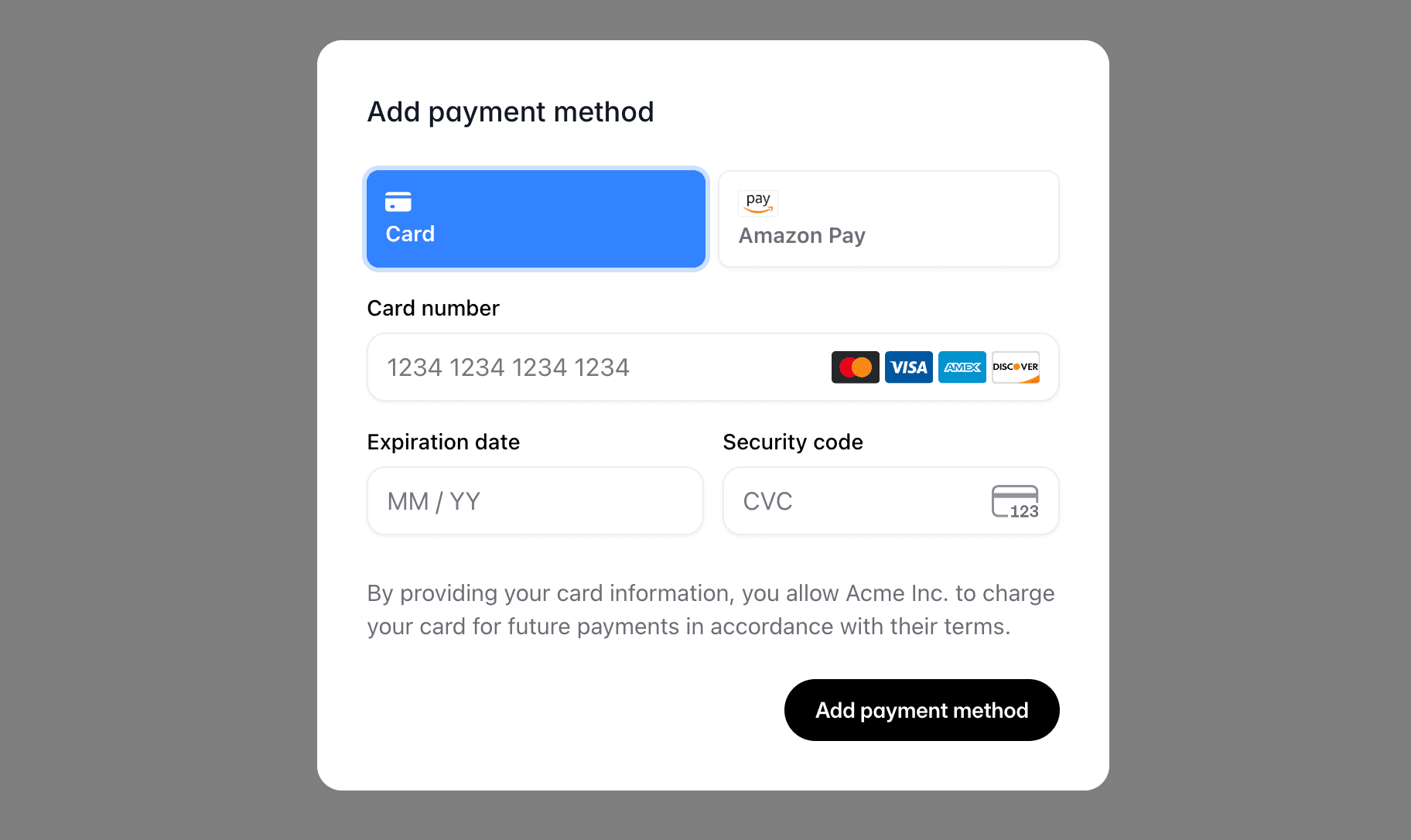 Let your customers securely add a payment method without leaving your site.
## Getting a session token
Every embed is authenticated with a short-lived **customer session token**. Create it **on your server** to keep the Polar access token secret, then hand the token to the client.
```ts theme={null}
import { Polar } from "@polar-sh/sdk";
const polar = new Polar({ accessToken: process.env.POLAR_ACCESS_TOKEN });
const session = await polar.customerSessions.create({
customerId: "the-customer-id",
});
```
The token expires after one hour and is scoped to that single customer.
## Implementation
Start by installing the SDK.
Let your customers securely add a payment method without leaving your site.
## Getting a session token
Every embed is authenticated with a short-lived **customer session token**. Create it **on your server** to keep the Polar access token secret, then hand the token to the client.
```ts theme={null}
import { Polar } from "@polar-sh/sdk";
const polar = new Polar({ accessToken: process.env.POLAR_ACCESS_TOKEN });
const session = await polar.customerSessions.create({
customerId: "the-customer-id",
});
```
The token expires after one hour and is scoped to that single customer.
## Implementation
Start by installing the SDK.